Latest Entries »

Over the years I’ve designed a lot of flows inside of Pega software, and a lot of assignment shapes, even a lot of assignment routing configurations. One part of that that generally gets a lot less use relative to other options is Skills Based Routing.

Even when they get discussed, Skills are often discussed to be used to handle “special” or “exception” scenarios, or very specific assignments that require a certain skill in some instances. In my experience, this has meant Skills Based Routing got used very little, if at all, just due to the business not having a need to do so.

Recently, I’ve been getting a lot more use of Skills in a design / implementation, and I have some thoughts as to how to significantly improve the use of skills.

What might you use skills for?

  • When a special certification or training is required to complete this part of this process.
  • When the customer is a VIP, so you only want VIP trained associates to handle the assignment.
  • When a certain level of approval is needed
  • There are many more…

But have you thought of these scenarios?

  • When your teammates are not trained in a standard way, therefore not all teammates are created equal.
  • When legacy systems across many business units have long ramp up times to become proficient.
  • When business context about the work becomes complex, and you get closer and closer to “Segments of One”
  • When N permutations of skills might be required in combination due to that same complex context.

Out off the box, when configuring Skills Based Routing, you have to do a series of things…
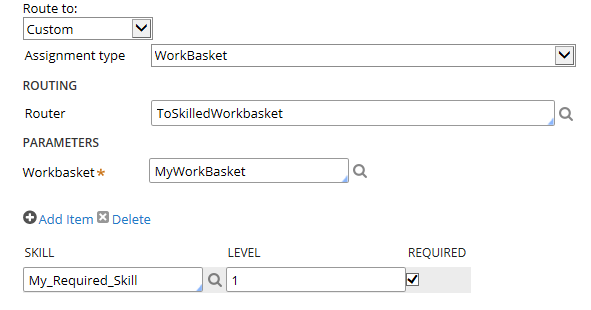
configure_skilled_assignment

  1. Add a new Assignment shape to the flow
  2. Use a custom router
  3. Select the desired skill(s) from a dropdown list

But this presents us with a few limitations.

  1. Every different skill & assignee combination a different assignment shape to add in the flow, create flow decisioning to get to, and then configure your Skills.
  2. Any intelligent or dynamic use of skills has to happen in the flow decisioning logic to “go to” the properly configured assignment shape.
  3. The flow has to be modified anytime this logic changes

This means if I have 4 skills that can be used in any combination of 1-2 then I have 16 different combinations to configure. If I have 3 different teams / workbaskets  it can also be routed to we now have 48 unique routing combinations in this scenario. I don’t want to have to add 48 assignment shapes.

Now imagine having even just 10 legacy systems used across your different business units, and within them 5 completely different ways to perfom the same task due to customer or business context. That’s a lot of ways you’ll need to train employees to use these systems, and therefore, in the real world, sometimes training is done in piecemeal, one “scenario” at a time. This is especially difficult in high-turnover positions that many back office operations teams face. It’s not ideal, but it’s how teams operate until they can get management support to do some disruptive transformation.

Now imagine you have 40 different assignments, multiple of which have the same complex requirements as to which teammates have the correct training to perform the task.

So how do we solve this (besides radical operations / IT transformation)?

We create a custom routing activity of course!

The goal of this activity is to dynamically determine 2 things..

  1. Where to route this work to based on context.
  2. What skill(s) to add to the assignment based on context.

This allows us to take the scenario above down to only 1-2 assignment shapes to configure, and no flow changes even if skills requirements change.

A few notes about what this activity has to do:

  • Do some normal assignment creation stuff, setting all the normal properties, calling NewDefaults, etc…
  • Determine the name of the assignment page that is being created (it differs based on HOW the assignment is created)
  • Call decisioning rules to determine what skills are required, maintain that list. This may require looping through a series of decisioning logic depending on how complex your routing / skills rules are due to the context and systems landscape.
  • Loop through your list of require skills and add them to the assignment page
  • Also potentially dynamically determine where to route this assignment as well, to further reduce the number of assignment shapes required to be configured.


Skills might be one of those things you NEVER even use, or if you do, it’s only for very simple scenarios. I think though, there are more uses for skills that what the average organization uses. Skills can be used to complement your training regimen and give your operations teams additional flexibility on how to get extremenly specific as to the best teammate to complete a piece of work. This has many benefits including productivity of team members, and to customer satisfaction.

In closing, perhaps one day we will see a bit more dynamic / intelligent assignment shape configuration out of the box when it comes to using skills – but at least we can always build our own!

If you’ve worked for a Fortune 500 company, you know what I’m talking about when I say there are “so many systems” used by IT to support the needs of the business.

But Why? There seems to be many reasons…

  • Legacy Systems that have been supporting the business for years and haven’t yet been replaced
  • Company Acquisitions bring on a whole new slew of systems that take time to integrate and replace
  • Rogue applications built by Business Units that got tired of waiting on IT and did their own thing
  • Specializations in business needs that require special software to be bought or built
  • Personal preferences of decision makers
  • Political agendas of decision makers
  • Build vs Buy philosophies that drive architectural decisions
  • Convincing sales presentations (regardless of how accurate they truly are)

I recently spent a large chunk of my professional time in recent years integrating two powerhouse software packages, and I have to say, it was rewarding, but challenging.

Salesforce.com provides a cloud based platform that historically focused on Customer Relationship Management, providing a robust suite of tools supporting the Sales, Marketing, and Service needs of businesses.

Pegasystems provides a suite of tools historically focused on bringing the power of Business Process Management applications to the enterprise in ways that are easy to implement and adapt over time.

Granted, the above are overly simplified descriptions of both companies, who both offer a host of products and services that often compete with each other in today’s world – but, needless to say, both companies consistently score in the top of their respective Gartner Magic Quadrants, and a Forrester Wave rankings.

Business doesn’t care about all the technical stuff us IT folks agonize over. They want systems that get the job done, and are easy to use.

Cue the ask to integrate these systems. As a Pegasystems Certified Lead System Architect, I’m on the team responsible for the Pega design and implementation. I do love a good challenge.

It was soon clear there would be some challenges along the way, the biggest ones were:

  • Integration tools available
  • Stateful vs Stateless applications
  • Different philosophies brought to the table by each software package

Integration tools available

The first big challenge we faced was determining how to integration these two software packages. Luckily for us, we had some options.

  • Salesforce had a tool they called Canvas that could be used to embed other applications inside of the their systems UI.
  • Pegasystems had a tool specific to Salesforce they called the Pega Process Extender on the Salesforce.com app Exchance
  • Pegasystems has it’s older Internet Application Composer (IAC) paradigm
  • Generic iFrame approach

After spending a significant amount of time and effort trying to make each of these options work, working with both vendors and performing several internal POCs, we ran into a big problem.

Stateful vs Stateless

The Salesforce UI was completely stateless, displaying all the data on it’s screen in a pretty static fashion with simple updates to the backend database when data changed.

Pega, however, is built on a stateful model when users are actually in the system performing work, with that work held on a clipboard as they work through a process flow at their own pace.

Pega also handles thread management if the user opens multiple browser tabs or browser sessions.

Salesforce, on the other hand, caused us some pain and could not handle the Statefullness of the Pega UI being displayed via any of these methods while people performed work.

It would appear that if all we were going to do was display static Read Only views of Pega data inside of Salesforce, these methods would work great, but because we wanted users to actually perform work controlled by the Pega application, we’d have to look for a different solution.

Web Services Saved the Day

Ultimately we decided to scrap trying to display Pega UI inside of Salesforce for performing work, and decided to integrate the two systems using web services. This was also a challenge, as now anything you want the systems to be able to do, has to be facilitated by data in these services, so they’re going to have to be robust.  If you think about it, under this type of approach you pretty much have to expose the hundreds of little things the Pega UI and engine does out of the box through services if you want to take advantage of them.

Here’s where we landed

  • Service 1: The workhorse, actions performed that created, modified, or finished work and work related data would use this service. This is everthing from creation, updates, performing local actions, finishing assignments, adding child cases, adding notes, the list goes on and is extensive.
  • Service 2: Search. We needed to be able to search for work via Case ID, Assignment Key, User Assigned to, User Work Party, and Business Context
  • Service 3: Retrieve History & Notes
  • Service 4: Retrieve Creatable Work Objects
  • Service 5: Retrieve Assignee List to faciliate transfers, and user lists when users could select who to assign work to
  • Service 6: Validate Operator. Simple service to take a User ID and tell you if it’s valid, and if so, what role / level of access the user has.

If you’re in Pega 7.1.8 or higher you’re in luck, some very similar Restful APIs have been created for you that perform much of the same functionalities, but we didn’t have that luxury as we built ours out well before. (Coincidence? I’d like to think we helped inspire something pretty cool and useful to everyone!)

In terms of displaying Pega UI inside of Salesforce, we still did that too, but we found out it worked best for Stateless views like read only reports, or simple screen flows designed to completed in one sitting.

Hopefully this was helpful to you, and if you have questions or are interested in doing something similar at your organization, please feel free to contact me!

Any BPMS solution worth its salt should provide efficiencies over time in the form of reusable assets in your code base.

There are several ways to to do this by design:

  • Parameterize your code/rules as much as possible
  • Define a proper object model / inheritance paths
  • Properly name, comment, and document your code/rules
  • Place your rules within the appropriate class to be reused
  • Develop rules in small and distinct, but meaningful pieces

By doing all of the above, the code you design and built should become more and more reusable over time and the applications you build today can be used as frameworks for the applications you build tomorrow and beyond.  Alternatively, you could of course run out and purchase a set of pre-built rules and code that serves the general purpose you’re looking for and configure/customize it to meet your needs. These are, in essence, the definition of a Framework.  I would argue that the BPMS tool itself is a very generalized framework used to built out BPM or BRE type applications within it, but what I’m discussing here are the frameworks of code/rules that sit on top of your basic BPMS install.

What is an example of these kinds of frameworks?

Consider the world of Insurance, and within that, the world of Claims. A single large insurance company may sell insurance policies for life, home, and auto, and naturally all insurance policies come with the ability to file a claim against your policy to extract value. While each type of policy will have some specifics in regards to the types of claim, we can find a lot of similarities between the three. It’s these similarities we could use to build out a Claims Framework that could be leveraged to built out applications for the individual lines of business to customize as needed. In our example these would include object models and related integrations, decisions, and business rules around customer information such as name, address, phone numbers, bithdate; basic constructs of policies such as policy number, date of issue; any servicing agent information, billing information, and basic constructs for filing a claim, retrieving policy information, etc…

Some vendors like Pegasystems sell add-on frameworks to do such things as Customer Management in the call center, Fraud Case Management, Retail Banking, Insurance, Healthcare, etc… These are also great framework starting points, but do have some downfalls discussed later in this post.

All businesses have basic and core concepts to their business that can be reused across applications, and all of these types of data and rules should be build out within a framework, that all of your other applications will sit on top of.
What then, are some benefits of utilizing frameworks?

The benefits of using frameworks, and really of any type of rule reuse efficiencies, is so that the rule only has to be maintained in one location, and should the need arise, modifying it in that one place will automatically let all the applications built on top of it pick up the new changes without additional code changes. This should ultimately reduce development and testing time, improve speed to market, and ensure consistent code is shared where it should be, easily maintained over time.

So, that’s some great news about using frameworks, what about the bad and ugly stuff, the stuff nobody wants to talk about you ask? Well, I’m going to tell you – with a bit of a disclaimer – I don’t have any inherent issues wrong with frameworks themselves, but it’s poor decisioning and application around the use of them that make up this next section of the blog.

So, here’s what to avoid when it comes to frameworks:

  • Don’t overdo it.

Too many frameworks aren’t practical and you end up having to use the same sets for anything anyway. Create your enterprise framework, perhaps frameworks for your internal divisions (if your company is large and diversified enough, and then application level frameworks such as the claims example up above.  If you buy an external framework, that’s great and all, but when you start building frameworks for other other frameworks, you’ve probably gone a bit overboard.

  • Don’t purchase a framework you’re not really going to use.

Just because you like 20% of what that framework does, don’t purchase it, just to throw out or completely re-customize the other 80%. It will be cheaper and less of a headache for you long term to just build your own framework on top of the base BPMS install.

  • Don’t build out your framework by not following proper guardrails

By just customizing the-ever-living-snot out of rules by hardcoding lots of stuff, custom java, html, javascript, etc… You’re not going to be happy when the base BPMS tool come due for an upgrade and you find out that because you customized so much stuff that either stuff is now broke, or you can’t take advantage of cool new OOB features. Be vigilant about following proper design and development guidelines and guardrails within your framework (you should always do this, but even moreso within a framework that will have additional application built on top of and dependent upon this code!)

  • Not all frameworks are created equal.

Say you’re looking for a claims framework, and you’ve decided to purchase one from the software vendor, or an outside third party – don’t assume that all other companies do things exactly like your company. On a high level, one would think that most claims applications are pretty straight-forward and will be somewhat alike. That’s true, however, what tends to be VERY different between companies is how they like to keep and structure their data and object relationships. This is the kind of stuff you should be hoping to benefit from within your framework as well as generic processes you can tailor, but you need to at least do due diligence to see if the framework is really going to work for you. Read the previous bullet point again if you’re unsure what I mean here!

One last note about frameworks – take your time designing out your framework because you’ll be building potentially multiple applications on top of it, and those applications will go through multiple versions, etc… take the time to get it right! For some additional tips for success within your BPMS implementations, please see my earlier blog post here.

As I mentioned in my earlier post, Nine Men Can’t Make a Baby In…, having the right team is essential.

In order to do that, and to lead or even work within a team efficiently, you need to be able to effectively manage your team and teammates. We could write for days on various schools of thought and advice on how to do so correctly, but I’d like to jot down just a few simple thoughts on the subject, which I will probably add to over time.

  • Team Diversity – I don’t mean have a diverse team just for the sake of being diverse, you need your teammates to be qualified, but having a wide range of experience, background, enthusiasm and intellect are important to bring fresh perspectives, and to challenge some assumptions that may be taken for granted.
  • Ability – Certainly consider demonstrated ability of those you bring onto the team, but also consider potential ability and then foster that growth of that individual.
  • Interviews / Growing the Team – Apply structure to the interview process, make strategic decisions about team growth, and ensure that every team member will add value to the team as a whole.
  • Communication – Communication plays a huge role in team management, and it’s not just what you say, but how you say it that matters. You want everyone on the same page – the worst thing you could have is inconstant messaging internal to your team, or even being communicated outside of the team. It’s better to over-communicate than to under-communicate – especially when it’s around what could be perceived as negative or confusing. And above all, be consistent!
  • Morale – Continuously gauge your team’s morale, and adjust accordingly. You don’t want to over or under-reward, but make sure people feel they are providing an important role, and then reward them accordingly. Sometimes it’s the little things that count, and each person is different as to what makes them feel valued.
  • Team Development – Always look for ways to further develop and enable your team members. Set high expectations and evaluate regularly with feedback. Open and unimpeded feedback channels within the team are highly valuable, but balance quality vs. type of feedback.

Most of what each of us does each day in our careers, especially for consultants, can fall under the category of Problem Solving. Therefore, it’s important that you are able to do so effectively.  And more than solving the problem effectively, it’s important to be able to communicate effectively in order to both determine how to solve the problem, and how to deliver your end message back to your audience.

A few years ago, I purchased the book  ‘The McKinsey Mind – Understanding and Implementing the Problem-Solving Tools and Management Techniques of the World’s Top Strategic Consulting Firm’  authored by Ethan M. Rasel and Paul N. Friga. This blog post is the combination of my experience regarding problem solving as a consultant, and some of the takeaways from the book I’ve incorporated into  my approach to problem solving.

Key Components of Effective Problem Solving:

  • Framing the Problem
  • Analyzing the Problem
  • Sourcing Data / Interviewing
  • Understanding the Results
  • Communicating your Recommendation

Framing the Problem

This involves utilizing some sort of structure to define the problem in managable component elements. Structure can help strengthen your thought process around the problem at hand. Consider using visual structures/diagrams to break the problem down. When you’re going through the process of breaking the problem down, ensure your components are unique and don’t overlap, while making sure to include any relevent issue into your structure. Over time, you will develop a set of tools that work for you, that can be leveraged time and time again, but remember, that every problem may be unique and any one tool isn’t a magic bullet. Early on in the process, as you identify key issues, come up with an idea, or a hypothesis of what the solution might be. If you have a hypothesis, you can attempt to prove or disprove it. In other words, don’t just search the haystack randomly, come up with the idea that there’s a needle you’re looking for first!

Also remember: “The Problem” is not always THE problem. Resist tempation to jump to the first conclusion, or the first diagnosis. Dig deeper, ask questions, look for facts. Always look to get to the real problem, though it might not be obvious or the first symptom you come across.

Analyzing the Problem

You’re hoping to identify the key drivers of the problem. It’s easy to get hung up on small details, to overanalyze (analysis paralysis). To combat that, take a look at the big picture, focus on the core issues, and ask yourself is what you’re spending time on getting you closer to your goal, or further away from it? Rule out what is NOT important, so right away you know you don’t have to waste any precious time on those things, look for some quick wins the can make big contributions to prove or refute your initial hypothesis. While you want to be correct, absolute precision might waste too much time, try to get into the right ballpark. If you’re finding it hard to find facts to support or refute your hypothesis directly, look for indirect indicators that may help you triangulate around the problem – use what you know, to help you learn about what you don’t know.

Sourcing Data

Data and facts are key to solving any problem. They are objective. They are also key to communicating out your solution back to the client. Don’t hide from the unpleasant facts, as that is only counter-productive to your problem solving effort. When researching and asking questions, don’t accept “I don’t know” as a valid answer. Everyone always has some sort of idea, or contribution to make. Most often, that response is the manifestation of the resistance to something and your challenge is to figure out the source of that resistance and adjust accordingly.  Start with available reports/statistics, look for key opportunities for investigation, and keep your eye out for best practices and if they are being followed.  Chances are the problem you are facing has been solved before, and thus, it’s important to retain and exploit your experience and your coworkers experiences to help solve similar future problems. To that end, knowledge management is important and part of the value that consultants should be bringing to the table. When it comes to data and quality, remember: garbage in, garbage out!

Sourcing Data: Interviewing

Go into interviews prepared. Know what questions you want to ask, and lay them out in a structured format, as sort of an interview guide or agenda. Consider whittling it down to the top 3 or 4 important questions and letting those spawn additional questions as the discusson goes on. Your time and your interviewee’s time is extremely valuable, be organized and efficent in order to gain the maximum value within the shortest amount of time. Listen. Really listen, and then guide as needed to keep the interview on track. Realize that your interviewee may be feeling stressed under pressure, and be sensitive to any fears they may have. Establish a connection, and explain positive objectives to them. Don’t leave your interviewee feeling regret twoards the process afterwards by being overbearing or too aggressive.  The most difficult interviews will be with the people whom feel their job is being threatened by you, handle those situations professionally and work through it for the benefit of the organization. Always ask an open ended question allowing your interviewee to tell you anything else that’s on their mind. And afterwards, follow up with a Thank you note – resist the urge to skip that small step, it’s important!

Understanding the Results

Approach the results with the same level of analysis as you did when first attempting to understand the problem. Check the data for accuracy, and what needs to be true for that piece of data to be a factor in the overall equation. Like back in math class, check your answer. How far off would your data/analysis need to be to completely change your recommendation?  The 80/20 principle holds true here, focus on what the 20% is doing right, and how you can bring the other 80% in-line. Charts can be helpful tools, and also be sure to keep daily track of what you learned that day that helped move your solution forward. For each piece of the analysis, ask yourself how is it useful and what recommendations it leads to? It’s your job as the consultant to provide insight into the problem you are solving, and you do that by making sound recommendations on the client’s problem. And lastly, don’t try to make the facts fit the solution, as it’s easy to fall into that trap when you’ve already made your hypothesis. Go back, create a new hypothesis if needed, but always ensure you are analyzing objectively.

Communicating your Recommendation

Communication and presentation skills are essential to effective problem solving. You can find the coolest solution ever, but it will mean nothing if you cannot present your findings and recommendations effectively to your clients. Think of it this way, you are selling something – in this case an idea/recommendation – and while you and your team may appreciate the value in that, you need to convince the buyers, your clients. Your presentation is the tool for getting that done and organization, simplicity, and meaningful information is essential for communicating the full impact of your idea. Speaking of meaningful information, charts are great, but they should serve a purpose and not just be there to look pretty. Bullet points are bad, visual representations of ideas are better.  In order to maximize buy-in, walk the key decision makers through your findings before the full presenation. This will help bring major objections out ahead of time, build consensus, and give you a chance to adapt to any external political realities. On presenation day, being flexible and respectful of your audience will go a long way!

The key to effective problem solving is taking a methodical, organized approach to analyzing the problem, and communicating effictively. If you can do those two things well, you’re going to find much better success as solving your problems more effectively.

One of the saddest parts of my job is when I hear from clients about #BPMS implementation disasters. Why? Because in almost every case it could have been avoided.  As consultants, we’ve all seen it… The client brings you in to help fight the fire left behind by an already in-progress, or already delivered application that was designed poorly and nobody bothered to tell the client that before they eventually figured it out the hard (and expensive!) way.  It’s just plain sad. While yes, it’s good for me, because I’m getting paid to help, I much prefer to get paid to help prevent such disasters and ensure success in the first place.

While I think this applies to every implementation, it is even more critical on the first or other early implementations while the client is still building their internal skillsets in the BPMS product.

I’ve noticed some commonalities I’d like to share with you:

  1. The clients hired outside consultants for expertise (usually from a single firm)
  2. If design reviews were done, it was by the same group of people who did the design in the first place
  3. Cost played a large factor in choosing which outside firm to bring in
  4. Implementation schedule was often rushed/aggressive (aren’t they all?)
  5. Vendor/Product guardrails weren’t properly followed
  6. Client employees may bring concerns/risks/issues to light, but backed down easily when the consultants reassured them

The above list may not be an exhaustive list of the warning signs for a potential disaster in the making, and may even all hold true for even very successful implementations, but the first key to prevention is awareness!

Let’s take a closer look at each one of these points.

The clients hired outside consultants for expertise (generally from a single firm)

The good news is: Clients are generally pretty good at understanding their own weaknesses, and know when they need to turn to outside help. This is when RFPs fly around, sales teams with polished presentations come in, and their best and brightest pre-sales technical teams come right along with them to amaze you with the speed and power of their skills. For the very first implementation, perhaps they turn to the software vendor itself even. There’s absolutely nothing wrong with turning to outside consultants for help, when needed. Perhaps the company has a standing list of approved contract partners they work off of to bring teams in. But generally, at the end of that process, a single firm is picked to help get the job done.

The bad news is: Clients don’t have the internal expertise in the first place, which also means they may not have the expertise to know if the people they are bringing in are true experts or not.  That same bright pre-sales tech team might not be the same team that shows up for the first day onsite. That’s not to say the team that does show up won’t be bright as well, it just means they are unknown. The client is trusting their chosen vendor to bring in experts, and guide the implementation in the very best way possible.

While being able to trust your vendors and contracting firms is important, until you’ve seen them succeed in your enterprise with the particular kind of task being asked of them, hope and blind faith is not a business strategy! To mitigate the risk of relying on a single outside firm for expertise contributing to a horrible BPMS design, consider using consultants outside from at least two firms. Like going, getting second opinions can be very valuable!

If design reviews were done, it was by the same group of people who did the design in the first place

Design reviews are an important part of your the BPMS governance process, and the Center of Excellence should be involved to some extent. This is critical early on as the team is maturing, because anything designed and built early on, will become the foundation for everything built in the future.  The issue with these problem design reviews were that the same people who did the design were the ones reviewing it, and obviously, no glaring deficiencies are likely to come to light during this process. Unless you are absolutely confident in your teams ability to produce excellent designs, I recommend having them reviewed by a separate team. Perhaps consider bringing in a 3rd party team specifically for these reviews. The cost of a second opinion is a small price of insurance to pay to protect against the implementation of a horrible design.

Cost played a large factor in choosing which outside firm to bring in

Business units & the IT teams that support them are under constant pressure to spend money wisely, and reduce expenses where they can. After spending potentially very large sums on money an a BPMS product, the thought of spending more piles of money on external consultants can be a hard pill to swallow. Sometimes these pressures cause staffing decisions to be a matter of cost. This can be fatal. Cheaper hourly rates do not necessarily mean cheaper long-term costs, especially in the scenario where you end up paying high-priced experts to come in and fight the fires in the event of a disaster. I’m not saying lower costs resources cannot be found that can do a good job, I’m just saying that it’s less likely, especially in a market such as BPMS implementations right now, and that the old magnums “You get what you pay for” and “Let the Buyer Beware” are in full effect. If you are choosing to go with lower cost service providers, ensure you do your due diligence to understand what the full expertise level of what you are buying is — and everyone you ask will tell you they are experts — you need to find this answer out externally, or via carefully designed interview processes and/or POCs

Implementation schedule was often rushed/aggressive

I’m not sure this needs much explanation, because so often this is the norm rather than the exception. The biggest problem I have with this is that it just amplifies potential issues. There’s less time to review for quality, less time to ensure the right solution is being implemented for long term success, less time to take a step back and see that something doesn’t look right, and — even if you do notice something is wrong, I’ve heard of project managers moving forward with the poor design anyway because they refuse to jeopardize the dates that were previously promised. This only exacerbates the problems in the long run. Agile and iterative methodologies are great when done correctly, but speed means nothing if you don’t do it right!

Vendor/Product guardrails weren’t properly followed

They’re called guardrails for a reason! If your consultants are actively advocating for designs that downplay or break the guardrails, that’s a warning sign. I’ve yet to come across an application that I needed to design a solution that significantly broke guardrails. Even in the instances when I did need to design outside of or bend the guardrails it was done in a very surgically targeted fashion, for a very specific purpose.

Client employees may bring concerns/risks/issues to light, but backed down easily when the consultants reassured them

Again, clients are pretty good at knowing what they don’t know, and knowing what they know pretty well too. If it feels funny and just doesn’t seem right, it probably isn’t. I’ve had clients who brought their concerns up to the previous consultants on multiple occasions and let themselves be satisfied with lengthy elaborate explanations that just confused them, so they let it go. Consultants hone their communication skills and messaging framing mechanisms to a fine art. Communication is a necessary skill for consultants, however, some become great bullshit artists! Remember: consultants are there to serve you, the client, and if something doesn’t feel right to you, don’t just give up at the first sign of resistance.

Recap on helpful practices to avoid this sort of disaster:

  • Like with doctors, sometimes a second expert opinion can be a lifesaver. Bring in multiple firms to work together if you can.
  • Design reviews should be done by someone(s) other than who did the design. That’s why it’s a review! These people should be your top experts in the product.
  • You get what you pay for, and design is not a place to skimp. Production support, small enhancements maybe, but please not on your whole design!
  • Take the time to do it right where you can. Lesser experienced teams sometimes take disastrous shortcuts when under pressure.
  • Follow the guardrails given by the product vendor, deviate from them only as rare exceptions, not for the basis of your design!
  • If it walks, talks, and looks like a duck. It’s a duck. Don’t let someone convince you it’s a swan!

If you or your team might be in need of a second opinion for a BPMS design review, or other services, let’s talk and see if I can be of any assistance!

One of the questions clients often ask me, is how can new developers to Pega learn the product quickly? Or, more appropriately, what skills should they be looking for in the people they’d like to move into their Pega practice?

While it’s technically true that anyone is theoretically capabile of learning the product, there are, however, some skillets which I have seen yield better results on average than newcomers without the same skillets. This is not meant to take away from allowing business users to use the system and manage rules –  this is geared more towards the technical folks who will be doing the design/development of the application.

The skill I would consider most beneficial when moving into being a Pega System Architect would be:

A strong understanding of Object Oriented Design & Principles (background developing in an OO language helps)

Pega’s product is built on JAVA, and produces JAVA code behind the scenes that is executed at runtime, but this recommendation has less to do with that aspect, and more to do with the overall design of both the OOB rules & class structure, and the designs of applications built within Pega. The idea of objects & their relationships is highly evident within Pega applications. Class Structures, and reusability of objects, attributes (properties), and other rules is carried out via inheritance paths. A good understanding of what an object is, how it relates to other objects, how it inherits properties & actions from its parents is a HUGE help in learning the product, and learning how to design well within it.

Additional skillets that I’ve seen be beneficial are:

  • Understanding of Integration types – Web Services, Queuing Mechanisms, File, HTTP, SQL, etc….
  • Understanding of HTML & XML, and to a lesser extent Javascript & AJAX
  • Understanding of logic. If then else & boolean expressions
  • Understanding of Relational Databases & their components
  • Understanding of Enterprise Architecture, WebApp Deployments/Architecture
  • Understanding of the concept of “work” and business process flows (workflow)
  • Business & Domain knowledge help as well, as it may be turned into data objects and rules within PRPC

As well as general software development basics such as:

  • Understanding of SDLC and various methodologies – especially agile/iterative ones
  • Understanding good design approaches and conventions
  • Understanding troubleshooting & testing techniques

One exercise I’ve found beneficial when training developers new to Pega/PRPC is to design out an application in their native OO language using such things as UML, Entity-Relationship Diagrams, Use Cases and Process flows and then design out the same application in Pega. While the syntax and the “rules” we use within Pega are a bit different, the general design concepts translate over pretty well. For example, within JAVA we have classes with attributes, methods, and constructors – and those classes can extend (or be extended by) other classes. In Pega, we also have a class structure and within each class we have properties, activities, and models. In addition, such things as decision logic (and virtually all structured functionalities) are abstracted out into their own rules within Pega for easy reusability by inherited classes & other rules.

While certainly much more goes into learning Pegasystems BPMS solution, I hope this is a good overview of some beneficial skills  that may help newcomers when first attempting to figure this stuff out!

This is a follow post to my last blog post, Eight Tips for Long-Term Success with your BPMS, taking a deeper look at one of the tips within.

In it, I wrote:

Tip #8: Implement automated governance to watch code quality. A good automated governance solution will match code against design/development guidelines and prevent it from being checked into the rulebase if it doesn’t meet those guidelines. In addition, creation of reports and an easy-to-use dashboard/portal can host a wide variety of reports to help ensure quality code is being delivered within your tool. Evolve this over time as design/code reviews, and multiple iterations begin to show you where there are gaps.

To which David Brakoniecki (@dajb2) commented:

This is a great list of BPM implementation tips but I am intrigued by #8. Can you expand on this point?

By automated governance, I seems like you have rules that do static analysis of the code quality inside the tool. Is this a feature built into Pega or have you written a custom framework to deliver this functionality?

I responded to his comment, and answered the Pega specific question there on that post, but I’d like to take the conversation one step further here.

Just what does the term “Automated Governance” mean?

In this sense, I’m referring to automating, as much as possible, the governance process that ensures the quality of the deliverables within your implementation.

Just what should this governance process entail?

Your governance process should entail all of the following, even if it’s being done as a manual effort, for now:

  • Checks that Enterprise & Area standards are being followed
  • Checks that the BPMS vendor guardrails are being followed
  • Checks that your methodology/process is being followed, including documentation
  • Checks against design/development coding standards are being followed
  • Checks for proper error/exception handling are in place, especially for integrations
  • Checks for proper security & access models are followed and monitored
  • Checks for performance risks
  • Checks for proper code documentation, naming standards
  • Checks for placement of code for best reusability
  • Ability to update/report/search asset library to enable reusability
  • Proper metrics/reporting by User for accountability purposes

If you aren’t doing one or any of these currently, implementing such governance can go a long way to ensuring long term success and quality of the applications being delivered within your BPMS. Once the process is in place, you can hopefully start implementing tools and additional software, generally within the BPMS tool itself to automate reporting and monitoring for these items.

How to Automate?

A good BPMS product will already have some out-of-the-box tools and reports that should help you get started, add to those with your own to help complete the picture. The best way to automate your governance is to prevent bad code and ensure guardrail compliance automatically at development time. You’re implementing software within another software tool, enhance it to aid in preventing non-compliance to defined best practices! For the scenarios you can’t prevent, at a minimum ensure that you can report on them to follow up, and look for trends on your reports that are improving over time.

For example, within Pegasystems PRPC BPM solution, there are several OOB reports I leverage, and I use the tool itself to build the additional things I need.

These include:

  • Enhancing the OOB Preflight report to provide username
  • Creation of a custom Rule-Portal instance and related gadgets for an “Automated Governance” Reporting Dashboard
  • Developer productivity reports
  • Rule Volatility Reports
  • Use custom rule errors that are checked when rules are saved during development, to reject the changes when they break your gaurdrails
  • Addition of custom rule warnings that are checked when rules are saved, these warnings show up on the Preflight report
  • Reports on what users are creating the most warnings in the last 7 days and last 4 weeks for trending purposes
  • Reports on overall warnings over the last 90 days for trending purposes
  • Ability to find warnings by type, severity and aggregate as needed
  • Ability to tie opportunities for improvement back to individual users
  • Ability approve creation/check in of certain rule types for tighter control
  • Enhanced reports regarding OOB rules that have been customized by the client
  • Reports to track the same rule being modified by parallel initiatives
  • Custom reports that interrogate the code base for more complex risk patterns

I recommend creating  a specific dashboard/portal managers can log in to to run the reports on-demand, and we’re currently discussing what their needs/desires are to have certain key reports automatically generated, attached to an email, and sent to the managers without the need for them to manually login.

The Key to All of This: Accountability!

You might notice many of the reports ultimately tie back to the individual users/developers. This is key. Nobody likes being singled out, and generally, nobody likes to be the bad guy singling other people out either, BUT without accountability, the quality of your application code and ability to reuse it properly will be mediocre at best. For proper excellence, you MUST hold people accountable for their actions (or lack thereof). At the end of the day we have human beings typing things into a keyboard that ultimately form the code that runs your application. The same code that will continuously be built on top on for years to come as you add features, make improvements, and expand your user base.

Use the report findings as teaching moments to educate the team members who are consistently showing up on the reports. Or, perhaps in a multi-team environment, you might notice the issue stems from a single team, perhaps that’s an opportunity to talk with the senior designer/developer on that team that may or may not be making recommendations to other team members, or perhaps there’s a gap the process somewhere and a need for a better checklist in a design or code review.

Implemented correctly, and following up on report results in a consistent manner should result in two trends:

  1. Quality & Reusability of code increases
  2. Dings on the Reports decrease

Here’s 8 tips I’ve assembled over the years of implementing Pegasystems PRPC BPMS, but I think they  apply to virtually any BPMS. While some/all of these seem like pretty standard best-practices – experience and discussions with industry peers has proven to me they aren’t well implemented in practice. I think it’s important to be thinking about each one of these things, and the earlier the better!

Tip #1: Use Out-of-the-Box capabilities for your first development iteration, then demo result to clients (and by clients I mean the business unit/leaders/users NOT IT), only customize or “improve” upon it after you’ve given them a chance to see it and make suggestions, and in-turn provide options. Too often, teams are to eager to dive in and start customizing before showing what the tool can do OOB. Additionally, keep in mind there’s a difference between “customization” of OOB features, and butchering of code. If you must customize, take the time to do it right!

Tip #2: Don’t rush your first implementation. Yes, quick builds can be done. Yes, I know the sales guys told you all kinds of cool stuff and you can do everything you need to do in 6 weeks, etc… However – what you build today will be the foundation of what you build tomorrow. Take the time to pour the concrete and reinforce it correctly before you build the house on top of it, so to speak.

Tip #3: “Later” is not a good time to implement a Center of Excellence, Design/Development guidelines, or to begin thinking about governance and reusable assets. In fact, I’d argue that BEFORE you start development is a great time to put some of this in place. Your ROI will be returned in magnitude down the road by getting this right…

Tip #4: The BPM space is growing, hiring is growing. Also growing: the number of people hired and rushed through poor enablement programs and then sold to clients as experts.  Companies don’t just grow their practice expertise by the thousands by hiring experts who are already experienced – there’s just not that many people with serious experience out there, yet. You hire outside for expertise (I hope), be aware if you’re getting it or not.

Tip #5: Don’t forget standard BPM practice of continuous process improvement for both the application, and your processes that support it. If you don’t have a strategy for this you won’t fully benefit from BPM. In order to do this correctly, you need proper metrics, and proactive measurements. You can’t know where you are if you don’t know where you were, nor can you judge if your changes are truly successful if you’re not measuring the correct criteria.

Tip #6: If you want your BPMS implementation to be successful, get the business highly engaged early in the process and design to let the business really manage their rules from within the application. Too often IT focuses on just delivering the application without thinking about how to truly give the power back to the business users. IT should enable this as a value-add from good design, not dictate a bureaucracy around how and when business can react to market changes.

Tip #7: When designing, be thinking about situational execution, that is, how can you inject flexibility into the design so unpredictable scenarios can be handled by the application you deliver? You can still control the end-to-end process and be flexible where needed, your process is incomplete if it doesn’t handle exceptions well. See my earlier post for a great case study on this. Users ultimately want flexibility, give it to them where you can/should!

Tip #8: Implement automated governance to watch code quality. A good automated governance solution will match code against design/development guidelines and prevent it from being checked into the rulebase if it doesn’t meet those guidelines. In addition, creation of reports and an easy-to-use dashboard/portal can host a wide variety of reports to help ensure quality code is being delivered within your tool. Evolve this over time as design/code reviews, and multiple iterations begin to show you where there are gaps.

I was a curious kid, I read a lot of books, I stuck my finger in light sockets, and I ask A LOT of questions. It was always why does this _______, what does that _________, how come __________, who, what, when where, why, and how. My mother and grandparents did their best to put up with my constant bombardment of questions, they took me to the library to find endless books about endless topics. Sometimes I’d find the answer, sometimes I’d be told I’d figure it out when I got older, sometimes i just forgot about one thing and moved onto ten more.

Today, as a BPM practitioner and consultant, I still find myself asking a lot of questions, just to different people and a different kind of question. Where does the process start? Who does what along the way? When do we know we’ve reached the goal? How can we make improvements? What are you unhappy about with your current system? Why why this proposed solution be a better solution? So on and so forth…

Many people think it’s about knowing the right answers, and while to certain extents that helps…. I think it’s even more important to know how to ask the right questions, and to know who to ask them to. Once you know that, the answers can be determined, but if you don’t know how to ask the right question, how do you know you’re getting the right answers? Furthermore, you only gain the right answers because at one time you asked the right question… How do I do this, How does this work, what happens if I, What have did I learn from this, What can be done better next time, etc…

As a child, success meant knowledge for the sake of having knowledge. It mean learning something new, just because. Success meant simply finding the answers to feed my curiosity. As an adult, and in my profession the real success comes with what I do with the answers I find out, but it’s the questions I ask that help me get there!

So, I’ll leave you with a question. Are you asking the right questions to be successful?